We Tested 7 AI Image-to-3D Models on the Same Photo
Every AI 3D generator claims to turn a photo into a great model. The only fair way to compare them is to give them exactly the same photo and look at what comes back. So we did that with every image-to-3D model in the Image to 3D app, plus the ones we added in September 2026.
How we tested
- Same input for everyone. Each model received the identical product shot: one object, centered, on a plain background. We created the test images with an AI image model so every model saw the same clean photo. Here we show two of the four test objects, a painted porcelain teapot and a small vinyl toy figure.
- The settings the app uses. Every model ran with the options the app sends by default, without the optional PBR add-on.
- One run per model and object, rendered afterwards in Blender under identical studio lighting. Nothing was retouched.
- Times are the median across the four test photos, one run each.
- Times are end to end: from upload until the finished model was ready, including waiting in the provider's queue, measured in September 2026. They change with server load.
The results at a glance
| Model | Tier in the app | Median time | Triangles | Textures | File size |
|---|---|---|---|---|---|
| Hunyuan3D v2 Mini | Quick | 34 s | 270–320K | none | 7 MB |
| Rodin 2.5 Fast | Quick | 66 s | ~19K | color | 1 MB |
| Trellis 2 | Standard | 71 s | ~190K | color + built-in material maps¹ | 6–8 MB |
| Pixal3D | Max | 5 min 23 s | ~195K | color + built-in material maps¹ | 6–9 MB |
| Hunyuan3D v3.1 Pro | Max | 3 min | 500K | color | 29–36 MB |
| Tripo3D 3.1 | Max | 3 min 17 s | ~197K | color | 6–7 MB |
| Rodin Gen-2.5 | Max | 2 min 26 s | 500K | color | 18–26 MB |
¹ Trellis 2 and Pixal3D produce material maps (roughness, metalness) on their own. That is separate from the optional PBR add-on (+9 credits), which is available on Hunyuan3D v3.1 Pro, Tripo3D 3.1 and Rodin Gen-2.5 and was switched off in this test.
Triangle counts partly reflect what the app asks for: Trellis 2, Pixal3D and Tripo are capped around 200K triangles to keep files phone-friendly. Pixal3D's time depends heavily on whether its servers are already warm. A later run finished in under a minute, while a cold start can take much longer.
Texture accuracy: the painted teapot
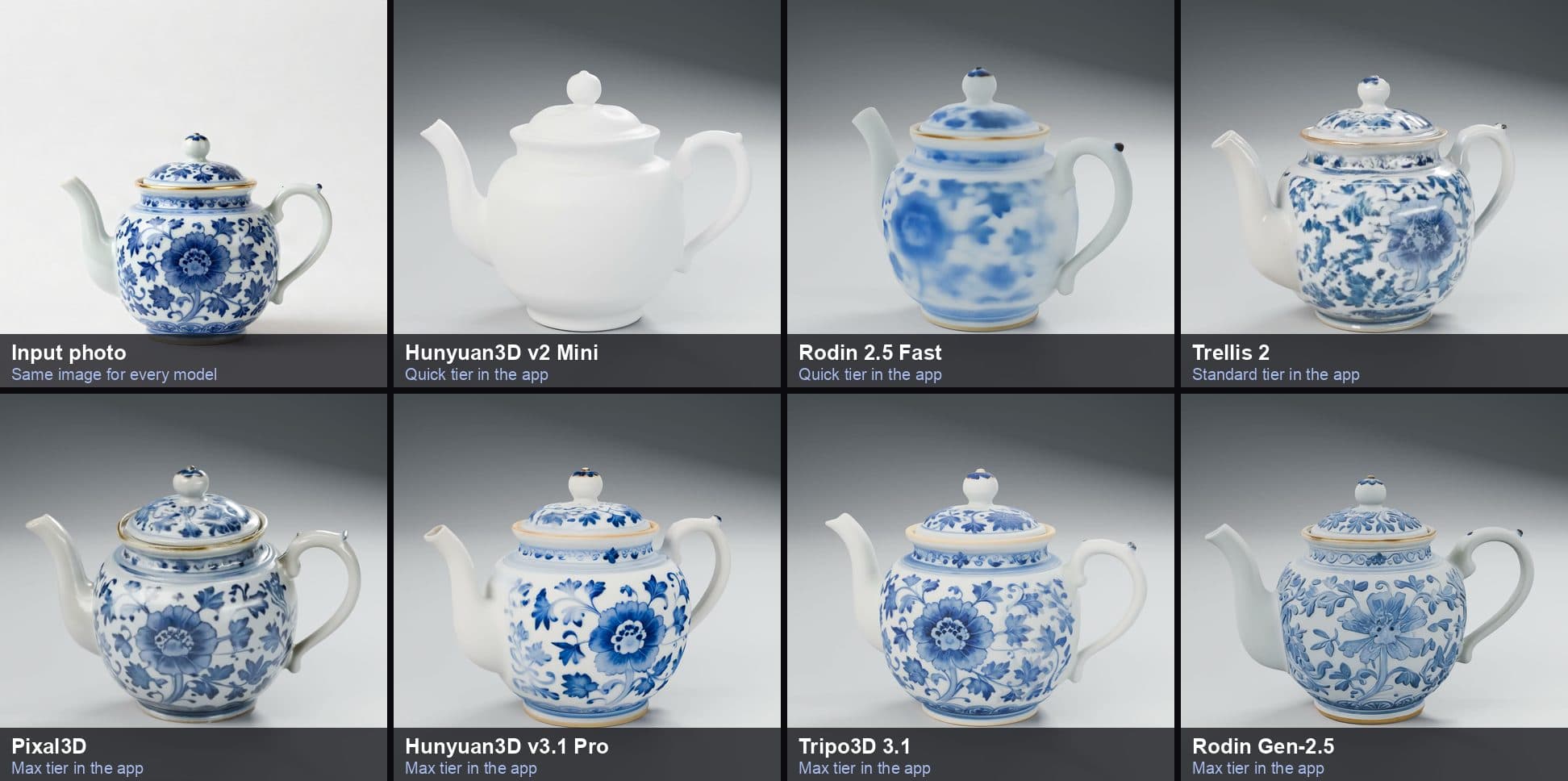
A painted pattern is a hard test: the model has to invent the back of the teapot and keep the brushwork sharp on a curved surface.
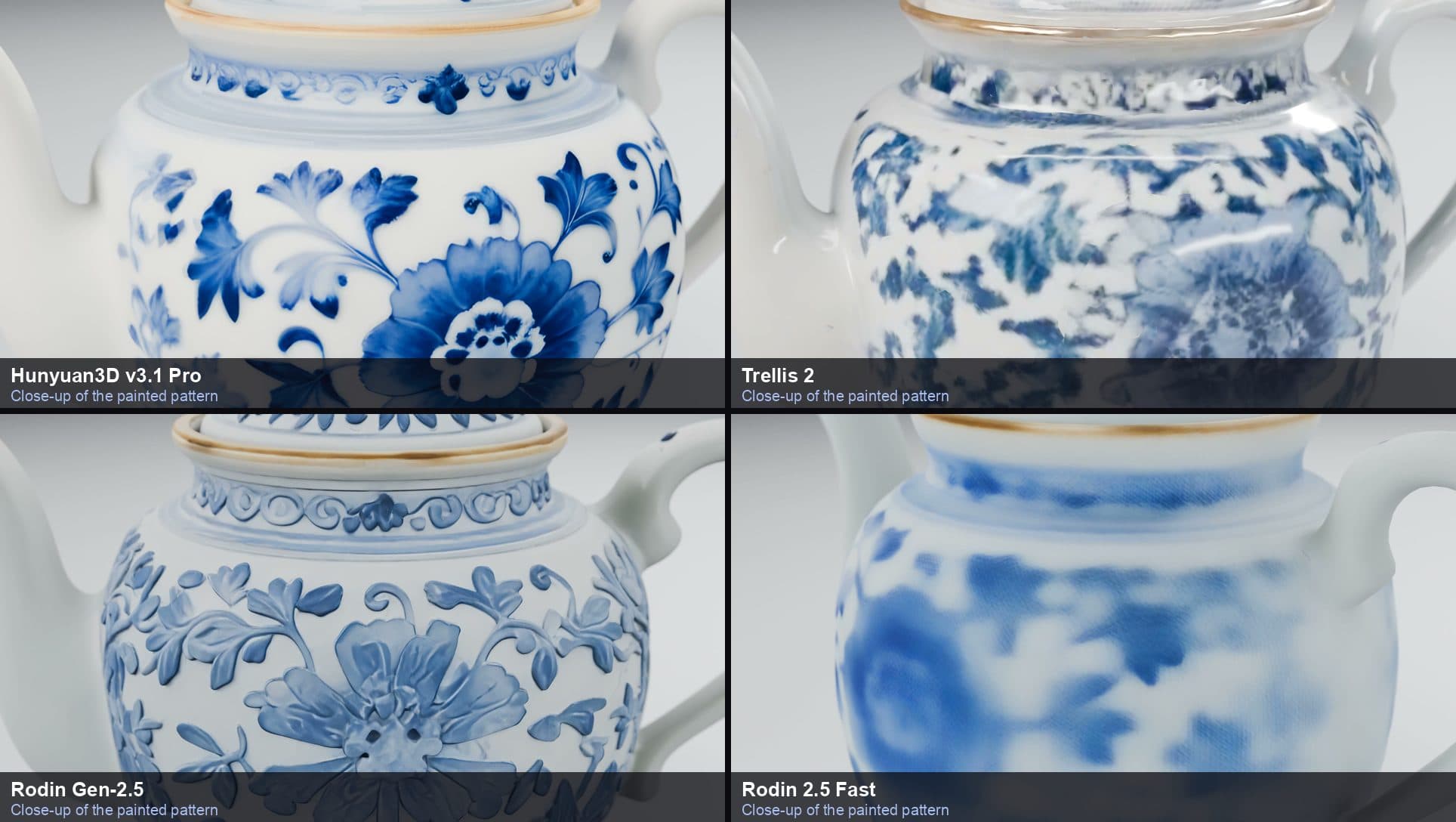
- Hunyuan3D v3.1 Pro and Tripo3D 3.1 reproduce the large peony and the ornamental band under the lid almost exactly.
- Pixal3D keeps the big flower and the overall layout, with slightly softer detail.
- Trellis 2 gets the colors and the style right, but fine brushwork turns into blotches when you look closely.
- Rodin Gen-2.5 reinterprets the painting: lighter blues and a pattern that looks raised. More on that below.
- Rodin 2.5 Fast gives a soft, blurred version of the pattern. It is recognizable, which is all a quick preview needs.
- Hunyuan3D v2 Mini produces shape only, without any color.
Geometry: what is left without textures
If you print a model in a single color, textures disappear and only the shape counts. So we rendered every result again in plain white.
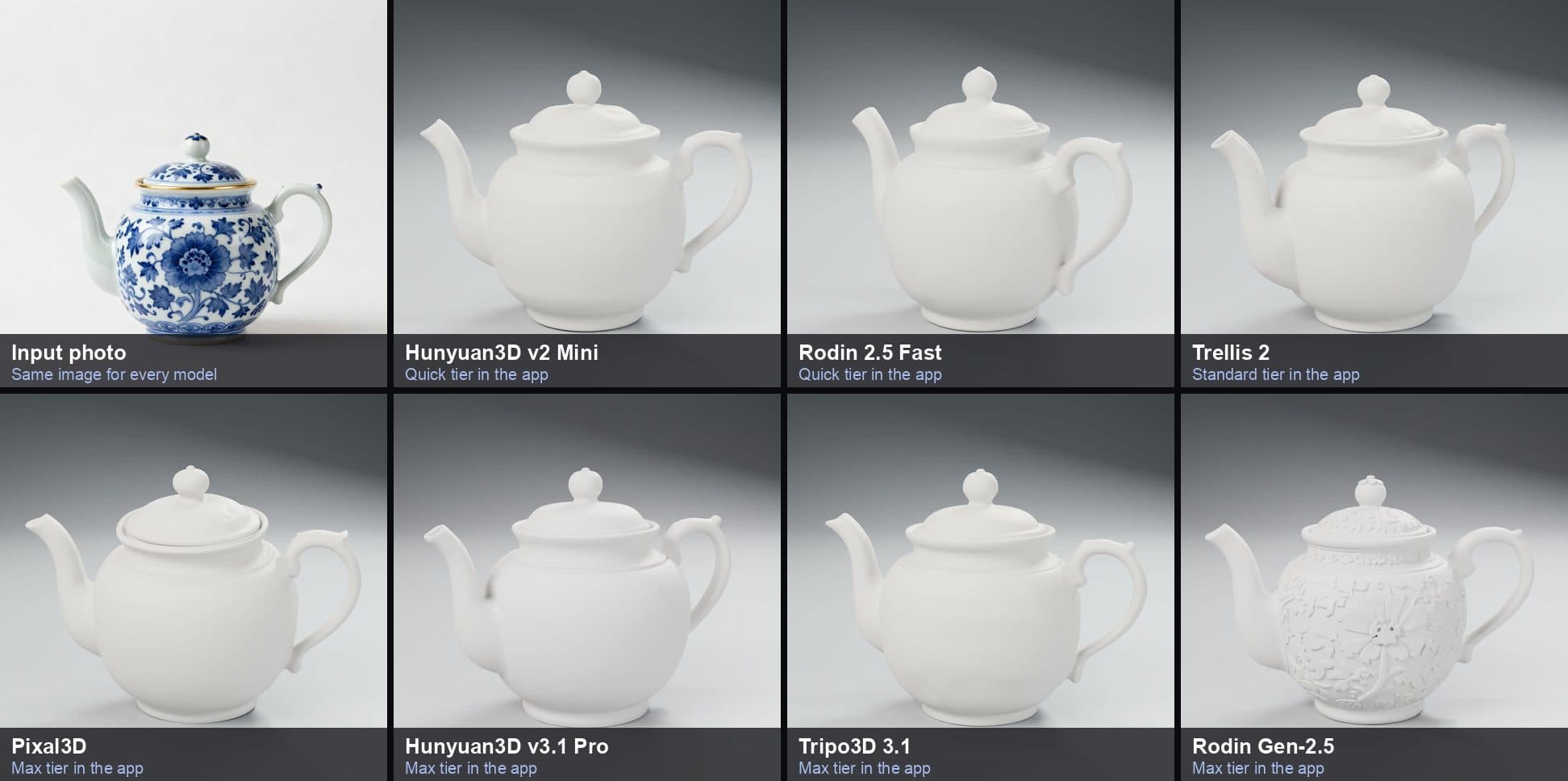
All seven models get the proportions, spout, handle and lid right. The surprise is Rodin Gen-2.5: it carves the painted flowers into the surface as real relief. The original teapot is smooth, so this is not what the photo shows. For a single-color 3D print, though, it is exactly what makes a figurine or vase look detailed instead of blank.
A simple figure
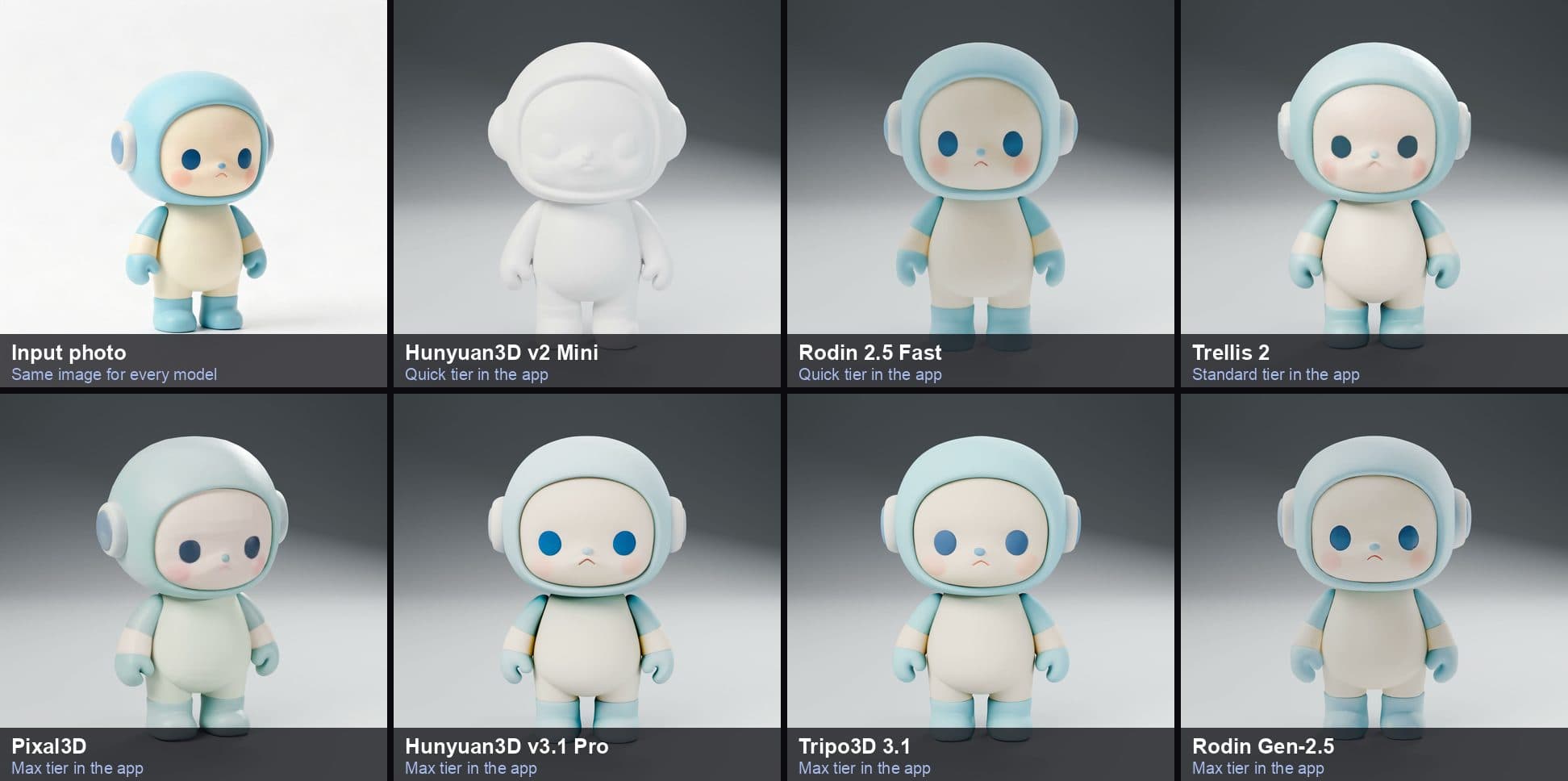
Simple, rounded objects are where the fast models shine. Rodin 2.5 Fast delivers a clean, colored figure in about a minute. Hunyuan3D v3.1 Pro and Tripo3D 3.1 match the original colors most closely. Pixal3D's version came out slightly desaturated, with a faint green tint on the body.
Which model should you use?
| Your goal | Best choice | Tier |
|---|---|---|
| Check the shape in seconds | Hunyuan3D v2 Mini | Quick |
| A colored preview, fast | Rodin 2.5 Fast | Quick |
| Everyday conversions, best value | Trellis 2 | Standard |
| The most faithful colors and patterns | Hunyuan3D v3.1 Pro or Tripo3D 3.1 | Max |
| 3D printing with visible surface detail | Rodin Gen-2.5 | Max |
| Detailed textures with material maps | Pixal3D (allow extra time) | Max |
Tips that matter more than the model
The input photo decides more than the model does. Use one object on a plain background, let it fill most of the frame, and shoot from a slight angle so depth is visible. Our photo guide covers this in detail.
If you use Multi-View with its default Tripo model, the order of the views matters. The model reads them as front, left, back and right. When we sent only a front and a back photo without a left view, the back photo was treated as the left side and the car came out warped. With the views in the right order, the same photos produced a clean model. The app now asks you to add the missing view first.
What we left out
We also tested Hunyuan3D v3.1 Rapid. During our test the provider returned its results as OBJ files with separate textures, and two of four runs failed on the provider's side. We have hidden it in the app until it delivers complete GLB models again.
Want to see all seven results on your own photos? Every model in this comparison is available in the app, and the Quick and Standard tiers finish in about a minute.
Ready to try it yourself?
Download Image to 3D and start converting photos today.